CRUD
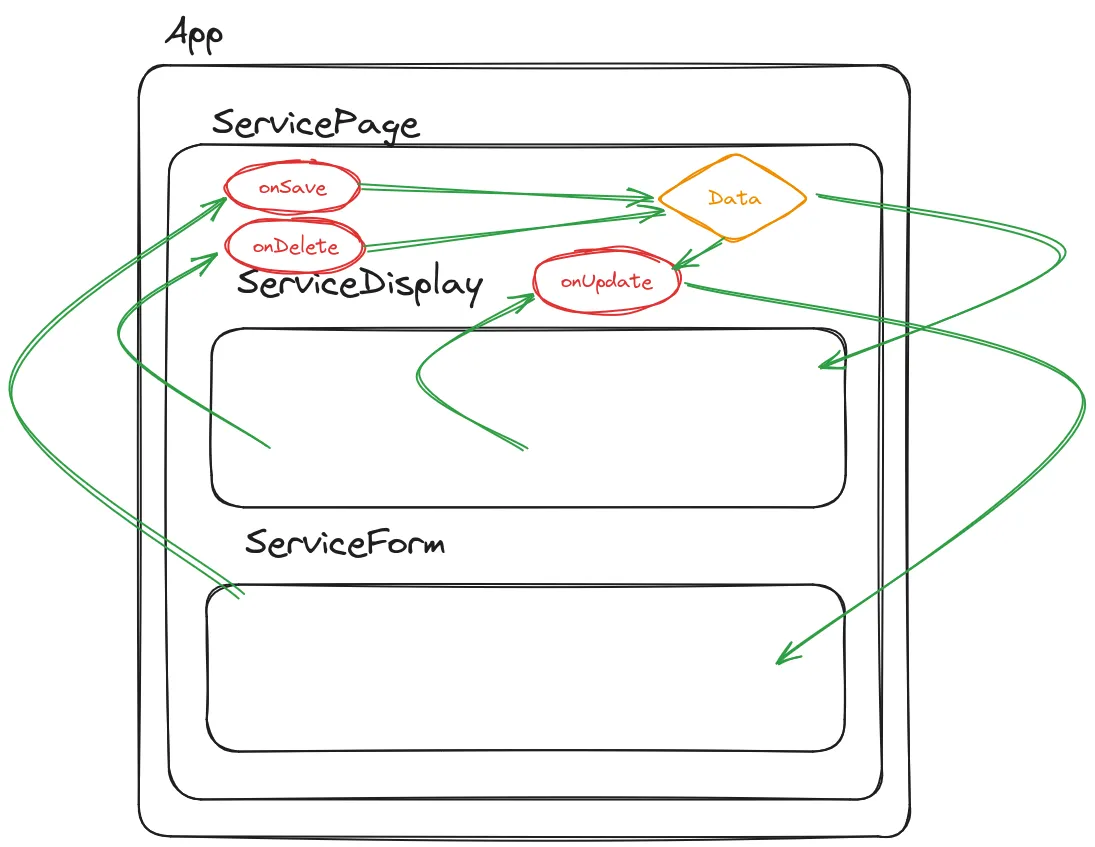
Typen definieren service.ts
export type Service = {    id: string,    customer: string,    kind: "small" | "big",    brand: string,    numberplate: string,    expense: number,    important: boolean,}
export type NewService = Omit<Service, "id">
Page beschreiben pages/ServicePage.tsx
import { useState } from "react"import { NewService, Service } from "../entities/Service";import { ServiceDisplay } from "../containers/ServiceDisplay";import { ServiceForm } from "../containers/ServiceForm";import { ThemeSwitch } from "../containers/ThemeSwitch";
export function ServicePage() {    const [services, setServices] = useState<Service[]>([        { id: crypto.randomUUID(), customer: "Lucy Fernandez", brand: "Lada", expense: 3, kind: "small", numberplate: "ZH30294", important: false },        { id: crypto.randomUUID(), customer: "John Smith", brand: "Toyota", expense: 5, kind: "big", numberplate: "ABC123", important: true },        { id: crypto.randomUUID(), customer: "Emily Johnson", brand: "Honda", expense: 4, kind: "small", numberplate: "XYZ987", important: false },        { id: crypto.randomUUID(), customer: "Michael Williams", brand: "Ford", expense: 6, kind: "small", numberplate: "DEF456", important: true },        { id: crypto.randomUUID(), customer: "Sophia Brown", brand: "Chevrolet", expense: 4, kind: "small", numberplate: "GHI789", important: false },        { id: crypto.randomUUID(), customer: "Daniel Miller", brand: "Volkswagen", expense: 7, kind: "small", numberplate: "JKL321", important: true },        { id: crypto.randomUUID(), customer: "Olivia Martinez", brand: "Nissan", expense: 5, kind: "small", numberplate: "MNO654", important: false },        { id: crypto.randomUUID(), customer: "James Taylor", brand: "BMW", expense: 8, kind: "big", numberplate: "PQR987", important: true },        { id: crypto.randomUUID(), customer: "Ava Garcia", brand: "Mercedes-Benz", expense: 7, kind: "small", numberplate: "STU246", important: false },        { id: crypto.randomUUID(), customer: "Ethan Anderson", brand: "Audi", expense: 6, kind: "small", numberplate: "VWX135", important: true }    ]);
    const [editService, setEditService] = useState<Service>();
    const onSave = (service: Service | NewService) => {        if ("id" in service) {            setServices((prev) => prev.map((s) => s.id === service.id ? service : s))            setEditService(undefined)        } else {            setServices((prev) => [                ...prev,                { ...service, id: crypto.randomUUID() }            ]);        }    }
    const onDelete = (id: string) => {        setServices(services.filter((service) => service.id !== id))    }
    const onUpdate = (id: string) => {        setEditService(services.find((service) => service.id === id))    }
    const onCancel = () => {        setEditService(undefined)    }
    return <div className={editService ? "edit" : ""}>        <ThemeSwitch />        <h2>Services</h2>        <ServiceForm onSave={onSave} onCancel={onCancel} edit={editService} />        <ServiceDisplay data={services} onUpdate={onUpdate} onDelete={onDelete} />    </div>}
Formular erstellen containers/ServiceForm.tsx
import { ChangeEvent, FormEvent, MouseEvent, useEffect, useState } from "react"import { NewService, Service } from "../entities/Service";
type ServiceFormProps = {    onSave: (service: Service | NewService) => void,    onCancel: () => void,    edit?: Service}
const defaultService: Service | NewService = {brand: "", expense: 0, important: false, customer: "", numberplate: "", kind: "small"};
export function ServiceForm(props: ServiceFormProps) {    const [service, setService] = useState<Service | NewService>(        {brand: "", expense: 0, important: false, customer: "", numberplate: "", kind: "small"}    );
    const onCancel = (e: MouseEvent<HTMLButtonElement>) => {        setService(defaultService);        e.currentTarget.closest("form")?.reset()        props.onCancel();    }
    const onSubmit = (event: FormEvent<HTMLFormElement>) => {        if(service) {            event.preventDefault();            props.onSave(service);            setService(defaultService);            event.currentTarget.reset();        }    }
    const handleChange = (event: ChangeEvent<HTMLInputElement | HTMLSelectElement>) => {        setService((prev) => {            let value: string | number | boolean = event.target.value;            if(event.target.name === "expense") {                value = parseInt(value);            }            if(event.target.name === "important") {                value = !service.important;            }            // Gefährlich, weil ...prev die Typisierung ausschaltet.            // Leider gibt es in TypeScript keine exact Types.            // Siehe https://github.com/microsoft/TypeScript/issues/12936            return {...prev, [event.target.name]: value}        });    }
    useEffect(() => {        if(props.edit) {            setService(props.edit);        }    }, [props.edit]);
    return <form onSubmit={onSubmit}>        <label>Name<input type="text" name="customer" required maxLength={50} onChange={handleChange} value={service?.customer} /></label>        <label>Marke<input type="text" name="brand" required onChange={handleChange} value={service?.brand} /></label>        <label>Aufwand in Stunden<input type="number" name="expense" required min={1} max={20} onChange={handleChange} value={service?.expense || ""} /></label>        <label>Serviceart<select name="kind" required onChange={handleChange} value={service?.kind} >            <option value="small">Klein</option>            <option value="big">Gross</option>        </select></label>        <label>Autonummer<input type="text" name="numberplate" required onChange={handleChange} value={service?.numberplate} pattern="^(AG|AR|AI|BL|BE|FR|GE|GL|GR|JU|LU|NE|NW|OW|SG|SH|SZ|SO|TG|TI|UR|VD|VS|ZG|ZH)[1-9]{1}[0-9]{0,6}$" /></label>        <label>Dringlichkeit<input type="checkbox" name="important" onChange={handleChange} checked={service.important} /></label>        <button type="submit">{props.edit ? "Ändern" : "Erstellen"}</button>        {props.edit && <button type="reset" onClick={onCancel}>Abbrechen</button>}    </form>}
Anzeige ermöglichen containers/ServiceDisplay.tsx
import { useContext } from "react";import { Service } from "../entities/Service";import { ThemeContext } from "../contexts/ThemeContext";
type ServiceDisplayProp = {    data: Service[];    onDelete: (id: string) => void;    onUpdate: (id: string) => void;}
export function ServiceDisplay(props: ServiceDisplayProp) {    const theme = useContext(ThemeContext);    return <table className={theme.darkMode ? "dark" : ""}>        <thead>            <tr>                <th>Name</th>                <th>Marke</th>                <th>Aufwand in Stunden</th>                <th>Serviceart</th>                <th>Autonummer</th>                <th>Dringlichkeit</th>                <th>Aktionen</th>            </tr>        </thead>        <tbody>            {props.data.map((service) => <tr key={service.numberplate}>                <td>{service.customer}</td>                <td>{service.brand}</td>                <td>{service.expense}</td>                <td>{service.kind}</td>                <td>{service.numberplate}</td>                <td>{service.important ? "✅" : "❌"}</td>                <td>                    <button onClick={() => props.onUpdate(service.id)}>Edit</button>                    <button onClick={() => props.onDelete(service.id)}>Delete</button>                </td>            </tr>)}        </tbody>    </table>}
Styles index.css
html {  height: 100%;}
body {  font-family: 'Segoe UI', Tahoma, Geneva, Verdana, sans-serif;  min-height: 100%;  display: flex;  flex-direction: column;  align-items: center;}
h2 {  text-align: center;}
input, select {  box-sizing: border-box;  display: block;  width: 100%;  margin-bottom: 0.5rem;
  &:user-invalid {    border: 2px solid #F00;  }}

form {  margin-bottom: 2rem;}
table {  border-collapse: collapse;}
table.dark {  background-color: #000;  color: #FFF;}
table th {  background-color: #EEE;}
td, th {  padding: 0.3rem;}
.edit table {  visibility: hidden;}
contexts/ThemeContext.ts
import { createContext } from 'react';
type Theme = {  darkMode: boolean;  setDarkMode?: (value: boolean) => void;};
export const initialTheme: Theme = { darkMode: false };
export const ThemeContext = createContext<Theme>(initialTheme);